
ChatGPT has two quotas. Most people only use one.
A practical guide to keeping Codex for code and sending light work to Chat.
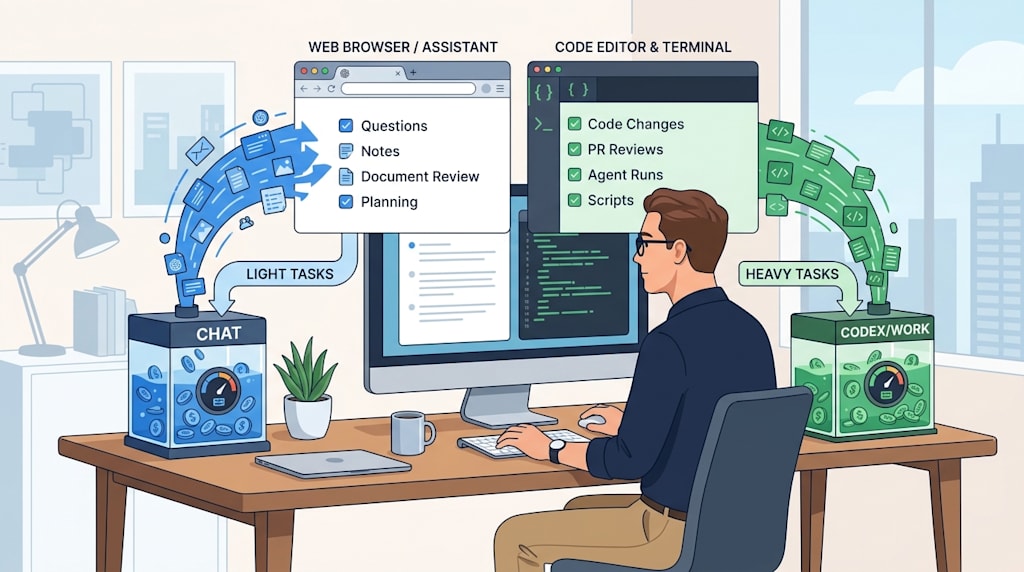
The short version: ChatGPT plan limits count chat conversations separately. They do not use the shared operations quota that covers Codex, Work, workspace agents, and ChatGPT for Excel.
That changes how you use the subscription. If your coding quota is gone, the web Chat tab can still talk. If you have work that does not require editing code, such as checking an API, reviewing a snippet, searching for an approach, cleaning up notes, or sorting a plan, you can move it into Chat and keep Codex for tasks that need hands.
You still pay for the subscription. The advantage is that one payment opens two separate budgets. Light work goes into one. Heavy work goes into the other.
Two pools, one wrong tab
Start with the tab.
On the web interface, select Chat, not Work. Work draws from the shared operations pool. Chat is the separate conversation pool. Ask a question, read a plugin, sort a document, review a plan, and keep it in Chat.
The official wording is plain: plan limits are shared by Codex, Work, workspace agents, and ChatGPT for Excel. Those are operations. Chat conversations are not included in that shared pool.
That is the base of the strategy.
Most people already treat the web interface as a chat window and Codex as a coding tool. But they still behave as if both burn the same fuel. So they hesitate to ask too much in Chat. They save questions for later. They worry that a long conversation will leave them short when it is time to write code.
With the right tab, that worry is misplaced. Light tasks can move into Chat. The coding pool stays for coding.
Why this design matters
Compare the alternatives.
Claude runs one pool. Chat and the coding agent draw from the same balance. Kimi runs one pool. The result is a familiar irritation: you start by talking through an approach, rewriting a paragraph, asking about a library, and somewhere in the conversation the coding quota drains. When the heavy work starts, the tank is low.
ChatGPT separates conversation from operations. That separation admits a simple fact: talking and doing are different kinds of consumption. Talking is exploratory, low-frequency, cheap. Codex and Work are result-driven, operation-heavy, expensive. Put them in one pool and the user has to choose. Split them and the user can move.
Quota anxiety has two fixes: pay more or use the other pool. The second one costs nothing extra.
The tasks that fit this move are ordinary. Look up an API signature. Ask for a code review. Search for a design option. Turn scattered notes into a document. Drop work material into Notion or Google Drive and have Chat read it back. None of that needs Codex. Move it into Chat. Save the operations pool for tasks that change files, run agents, or push work forward.
Chat alone is thin. Plugins add context.
A plain chat window has limited context, which is a fair objection.
The answer is the plugin layer. ChatGPT’s web interface has plugins that add context and connect to external systems. You can install GitHub, Gmail, Notion, Google Drive, and custom MCP connections. The plugin market has more.
A few concrete examples.
Ask it to look at code. Select the GitHub plugin and point it at a repository you have been working on. Ask what the latest commit was and what the last few commits changed. It reads the repository and lists the commits. The iteration path is in front of you. That kind of look-it-up, review-it, search-for-an-approach work does not need Codex.
Ask it what you have been doing. Connect your flomo through a custom MCP, then ask, "What have I been up to lately?" It reads your recent notes and answers with your recent state. The context is no longer missing. The conversation has a floor to stand on.
There is a small switch to know: open the plugin, scroll down, and turn on Developer mode. It warns you about risk. Turn it on if you want to see the tool calls: which commits it listed, which commit it pulled. Each step is visible. You can see what the model read and what it did instead of staring at a black box.
The wilder move: plug in your own MCP
With Developer mode on, there is a further step: connect your own MCP.
Open the plugin, choose Browse plugins, choose Create app, then Create MCP app. You can paste your own MCP endpoint. One link and it is connected. That is how a flomo connection gets added.
From there, the questions get bigger. Can you map a local service to the public internet? Can you use a tool like MCPX? Once the connection reaches your local machine, the surface area grows. What you do with it is up to you.
Keep one boundary in mind: capability brings risk. Developer mode shows a warning for a reason. Mapping local services to the public internet deserves a security review before it deserves a shortcut. Do not expose a private repository, a local service, or personal data to save a little quota. The bargain only works if the door stays locked.
A safer version of the same move: put documents and work material into Notion, or the Google suite, and let ChatGPT read and write there. Tokens are saved. Plan sorting and document cleanup happen inside Chat. Your knowledge base becomes the context; Chat becomes the organizer.
The GitHub trap: read-only
The GitHub plugin has a different shape. It is read-only.
OpenAI’s documentation is direct: the GitHub app in ChatGPT can read your repositories for code analysis and search. If you ask it to change code or push a PR, it asks for permission. You allow it. Then you get a 403.
That response is deliberate. The system wants you to use Work or Codex for that job.
So give the GitHub plugin the right job: read code, search code, inspect commits, review a change, understand project structure. Leave write operations, PRs, and repository changes to the Codex/Work pool. Keep that line clear and you will not waste a session asking Chat to do something it is built not to do.
The arbitrage: switch pools, do not add money
Go back to the comparison.
Claude runs one pool. Chat and the coding agent draw from the same balance. Kimi runs one pool. ChatGPT splits conversation from operations. That split is the advantage. Light work moves into Chat. The Codex quota stays for the heavy work.
A simple task map:
Ask questions, search approaches, read code, review, summarize documents: Chat.
Edit code, push PRs, run complex operations, use Work agents: Codex/Work.
Organize documents, read or write Notion or Drive: Chat plus plugins.
Heavy execution: the Codex/Work quota you saved.
The strategy is allocation. You are assigning tasks to the right budget. You paid for the subscription, not for one button. The chat pool and the operations pool are separate. Let each do its job.
Official limits can change. Check your account interface for the current rules. Under the current design, the lesson holds: quota anxiety does not always require more money. Sometimes it requires a different pool.
Keep light work in Chat. Keep heavy work in Codex. Same subscription. Two wallets.
About the Creator
Jin
Writer of reamstories
https://reamstories.com/jin
Enjoyed the story? Support the Creator.
Subscribe for free to receive all their stories in your feed. You could also become a paid subscriber, letting them know you appreciate their work.
Comments
There are no comments for this story
Be the first to respond and start the conversation.