
Backend Development 101: Core Concepts and HTTP Foundations
Backend Developer Challenge (Firebase & Node.js Edition)


Welcome to Day 1 of the 100-Day Backend Developer Challenge (Firebase & Node.js Edition)! Whether you’re coming from a frontend background, just beginning your software journey, or are curious about what goes on behind the scenes of your favourite apps—this series is for you.
Today’s topic is foundational:
- What is Backend Development?
- What does a backend developer actually do?
Let’s dive deep into what backend development is, why it's important, what technologies are involved, and what responsibilities you’ll take on as a backend developer.
What is Backend Development?
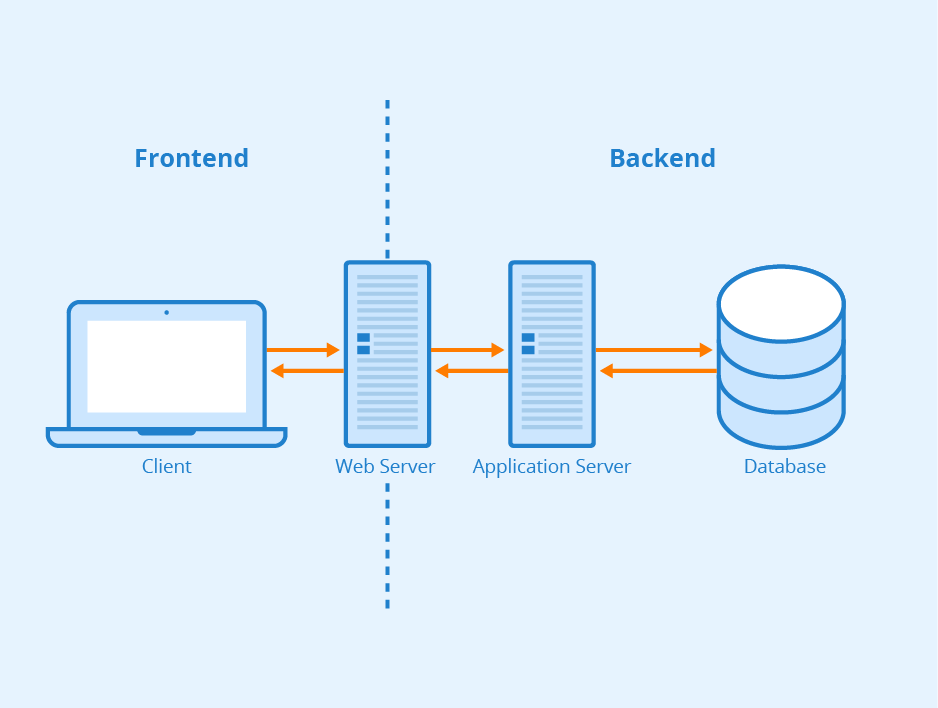
Backend development refers to everything that happens behind the scenes in a web or mobile application. It’s the logic, database, server, and application architecture that powers the app you see on your screen.
If frontend development is the face of the application, backend development is the brain and the spine.
In simple terms:
- Frontend = What users see (UI)
- Backend = What makes it work (logic, data, infrastructure)
The backend is responsible for:
- Processing requests
- Handling data
- Managing authentication
- Running business logic
- Connecting to databases
- Communicating with other services
Frontend vs. Backend
Focus:
Frontend: User interface & user experience
Backend: Data management, security, and application logic
Runs On:
Frontend: User’s browser or device
Backend: Server or cloud environment
Technologies:
Frontend: HTML, CSS, JavaScript, React, Vue
Backend: Node.js, Python, Firebase, SQL, MongoDB
Examples:
Frontend: Buttons, menus, animations
Backend: API endpoints, database interactions, user authentication
Analogy:
Frontend = Waiter taking your order
Backend = Chef and kitchen preparing your meal
The two must work together seamlessly to provide a great user experience.
Why is the Backend Important?
Imagine a social media app where you can see the interface, but your messages don’t send, your login doesn’t work, and nothing updates. That’s what happens when there’s no backend.
The backend is essential because:
- It stores and retrieves data
- It enforces rules and permissions (business logic)
- It secures sensitive information (e.g., passwords)
- It scales to handle thousands or millions of users
- It communicates with third-party services (payment gateways, analytics, etc.)
Without a reliable backend, the entire application collapses.
Core Responsibilities of a Backend Developer

Backend developers handle several critical areas. Here’s a breakdown of your future daily responsibilities:
1. Building APIs (Application Programming Interfaces)
You create endpoints that frontend or mobile apps can call to retrieve or send data.
Example:
GET /api/users/12345
2. Database Management
You design, create, and manage databases.
- Choose between SQL (e.g., PostgreSQL) and NoSQL (e.g., Firebase Firestore, MongoDB)
- Optimize queries
- Ensure data consistency and security
3. Authentication & Authorization
Implement secure login systems, permissions, and roles. For example:
- Who can access admin routes?
- Is the user logged in?
- Are they allowed to delete that comment?
4. Business Logic
This is the “brain” of the application.
- What happens when a user buys a product?
- Should a user get a discount after 3 purchases?
- How do we match students with tutors?
5. Server & Infrastructure Management
You may:
- Configure hosting environments
- Deploy apps to the cloud (e.g., Firebase, Heroku, AWS)
- Monitor server performance and uptime
6. Security
Protect user data and prevent:
- SQL injection
- Cross-site scripting (XSS)
- Denial-of-service (DoS) attacks
7. Error Handling & Logging
Keep systems running smoothly by:
- Catching exceptions
- Logging critical issues
- Alerting you when services go down
Key Backend Technologies
Here are some common backend tools you’ll hear about often:
1. Language
- JavaScript (Node.js)
- Python
- Go
- Java
2. Database
- Firebase
- PostgreSQL
- MongoDB
- MySQL
3. Hosting
- Firebase Hosting
- Vercel
- Heroku
- AWS
4. Authentication
- Firebase Auth
- Passport.js
- Auth0
5. API Tools
- REST
- GraphQL
- Express.js
6. Caching
- Redis
- Memcached
7. DevOps
- Docker
- GitHub Actions
- CI/CD pipelines
How Firebase and Node.js Fit In
In this 100-Day Challenge, you’ll use Firebase and Node.js to build backend systems. Here’s why:
Node.js
- JavaScript-based backend
- Event-driven and fast
- Perfect for beginners
- Works seamlessly with frontend React or Vue
Firebase
1. Serverless backend platform
2. Handles:
- Authentication
- Databases (Firestore, Realtime DB)
- Hosting
- Functions (serverless APIs)
3. Great for rapid prototyping
4. Scales effortlessly
Together, they provide both traditional and serverless backend experience.
Common Backend Architecture Patterns
As you grow, you’ll encounter patterns like:
1. Monolithic Architecture
Everything (frontend, backend, database) is in one codebase. Easy to start, but hard to scale.
2. Microservices
The app is split into smaller services that talk to each other. More scalable, but complex to manage.
3. Serverless Architecture
No need to manage servers. You deploy functions that run on-demand (e.g., Firebase Cloud Functions).
Backend Developer Job Roles
Here are common backend-related job titles you may pursue:
- Backend Developer – Focuses on APIs, databases, and server-side logic.
- Full-Stack Developer – Works on both frontend and backend development.
- DevOps Engineer – Manages deployment processes, CI/CD pipelines, and infrastructure.
- Cloud Engineer – Specializes in cloud platforms such as Firebase, AWS, or Azure.
- Database Administrator (DBA) – Maintains, secures, and optimizes database systems.
- Software Engineer – A broad title that often includes backend responsibilities like system design and API development.
Real-World Example: What Happens When You Click “Buy”?
Let’s break it down:
- Frontend triggers a button click.
- API Call is made to the backend: POST /purchase
- Backend:
- Validates if the user is logged in
- Checks if the item is in stock
- Creates an order record in the database
- Charges the user via a payment gateway
- Sends confirmation email
- Returns a success or failure message to the frontend.
All of this magic happens on the backend. Pretty cool, right?
What is HTTP?

HTTP (HyperText Transfer Protocol) is a communication protocol used for sending and receiving data between clients (like web browsers or mobile apps) and servers (like your backend).
It’s stateless, which means every HTTP request is treated independently.
Analogy:
HTTP is like sending a letter:
- You (client) write a message.
- Send it through the post office (internet).
- The recipient (server) opens it and responds.
This happens every time you click a link, load a page, or submit a form.
How the Web Works
Before we go deep into HTTP, let’s simplify how the web functions:
- You enter www.example.com in your browser.
- The browser sends an HTTP request to a web server.
- The server processes the request.
- It sends back an HTTP response (usually HTML, JSON, etc.).
- Your browser displays the result.
- It’s a request-response cycle. Always two-way communication.
HTTP Requests
An HTTP request is the message your client sends to a server when it wants to:
- Load data
- Submit a form
- Upload a file
- Authenticate a user
- Or do literally anything online!
A Request Consists Of:
- Method: What you want to do (GET, POST, etc.)
- URL: What resource you’re interacting with
- Headers: Metadata like content type, authentication
- Body (optional): Data sent with POST/PUT requests
Example:
GET /api/products HTTP/1.1
Host: example.com
Accept: application/json
This means:
“Hey server, give me the list of products. I accept JSON format.”
HTTP Methods
There are several HTTP methods (also known as "verbs") that define what kind of action the client wants to perform.
Most Common HTTP Methods:
1. GET
- Retrieve data
- Fetch a product, user profile
2. POST
- Send data
- Submit form, create account
3. PUT
- Replace data
- Update entire user profile
4. PATCH
- Modify data
- Update only the email
5. DELETE
- Remove data
- Delete a post or account
Examples in REST APIs:
- GET /users → Get all users
- GET /users/42 → Get user with ID 42
- POST /users → Create a new user
- PUT /users/42 → Replace user 42’s profile
- PATCH /users/42 → Change part of user 42’s profile
- DELETE /users/42 → Remove user 42
HTTP Responses
An HTTP response is the server’s answer to your request. It includes:
- Status Code (200, 404, 500, etc.)
- Headers
- Body (data or HTML)
Example:
HTTP/1.1 200 OK
Content-Type: application/json
{
"id": 42,
"name": "Jane Doe",
"email": "[email protected]"
}
Status Codes
These tell you what happened with the request.
Success Codes:
- 200 OK : Successful GET or POST
- 201 Created: Resource was successfully created
- 204 No Content: Success, but no data returned
Redirection Codes:
- 301 Moved Permanently: URL has changed
- 302 Found: Temporary redirect
Client Error Codes:
- 400 Bad Request: Your request is malformed
- 401 Unauthorized: You need to log in
- 403 Forbidden: You’re not allowed to do that
- 404 Not Found: The resource doesn’t exist
Server Error Codes:
- 500 Internal Server Error: Something went wrong on the server
- 503 Service Unavailable: Server is down or overloaded
Headers and Body
Headers
Think of headers as the metadata of a request or response.
Examples:
- Content-Type: application/json
- Authorization: Bearer <token>
- User-Agent: Chrome
Body
The body contains the actual data you're sending or receiving.
Only used in POST, PUT, PATCH requests.
Example JSON body:
{
"email": "[email protected]",
"password": "securePassword123"
}
Common Use Cases in Backend Development
As a backend developer, you'll work with HTTP every day.
Scenarios You’ll Handle:
- Accepting login credentials (POST /auth/login)
- Fetching a product list (GET /products)
- Submitting a support ticket (POST /tickets)
- Updating user settings (PATCH /users/123)
- Deleting an old post (DELETE /posts/789)
Every interaction between client and server uses HTTP.
Hands-On Example Using Postman
Let’s test it out!
- Download Postman – a tool for sending HTTP requests.
- Open Postman and send a GET request to:
https://jsonplaceholder.typicode.com/posts
- You’ll get a JSON array of fake blog posts.
- Now try a POST to:
https://jsonplaceholder.typicode.com/posts
With a JSON body:
{
"title": "My First Post",
"body": "This is the body of the post",
"userId": 1
}
- The response should show you the data you “created”.
Even though the server doesn’t actually save it (because it’s fake), you’ll learn how real HTTP works.
Bonus: HTTP vs HTTPS
HTTP = Insecure
- Data is transmitted as plain text.
- Can be intercepted by hackers.
HTTPS = Secure
- Uses SSL/TLS encryption.
- Essential for login, payment, personal data.
Firebase automatically uses HTTPS. You’re safe!
How This Connects to Firebase & Node.js
In Node.js
You’ll build Express.js routes that handle HTTP requests:
app.get('/users', (req, res) => {
res.json(users);
});
In Firebase
You’ll create Cloud Functions that act like APIs:
exports.getUsers = functions.https.onRequest((req, res) => {
res.json({ message: 'Hello from Firebase!' });
});
Everything depends on handling HTTP methods and responses correctly.
Final Thoughts
Backend development is the invisible engine behind every powerful application. From managing user data and authenticating requests to storing messages and processing orders, the backend is where real work happens. Today, you explored the fundamentals—what backend development is, why it matters, and how developers bring systems to life using Node.js and Firebase.
You also discovered how HTTP acts as the bridge between users and servers—defining how requests are made and how data is returned. Understanding HTTP is a foundational skill that every backend developer must master.
This knowledge isn’t just theoretical. It’s what powers real-world features like login pages, checkout flows, and interactive dashboards. As a backend developer, you are the logic, the security, and the structure behind every app interaction.
What’s Next?
In the next blog post of the 100-Day Backend Developer Challenge, we’ll build on this foundation by exploring:
JSON Format – the universal data format used in APIs and backend communication
API Communication – how frontend apps interact with your backend
JavaScript Fundamentals – a practical review of variables, data types, and functions for backend work
Understanding how data is structured, transferred, and manipulated in JavaScript will prepare you to create your first backend endpoints with confidence. We’ll also explore how JSON plays a vital role in REST APIs and backend logic.
Action Steps Before the Next Post
Congratulations! You’ve just taken your first step toward becoming a backend developer.
Here’s what to do next:
- Review this post and take notes on key terms (e.g., HTTP, backend, API, Firebase)
- Set up a GitHub repo for your 100-Day Challenge
- Try sending sample HTTP requests using Postman or curl
- Bookmark this series to stay on track
🙌 Let’s Connect!.
About the Creator
CodeBloom
CodeBloom is a beginner coder sharing her journey, lessons, and small wins—growing and building through curiosity, one project at a time.
Enjoyed the story? Support the Creator.
Subscribe for free to receive all their stories in your feed.
Comments
There are no comments for this story
Be the first to respond and start the conversation.