
5 Free SEO Extensions That Will Change Your Workflow
Save Hours Every Week With the Right Browser Stack


SEO pros spend a lot of time on data extraction and other routine tasks. That’s exactly why 58% of top agencies automate their pipelines right now. Some write formulas or scripts for Google Sheets, while others use ready-made tools.
Today, we're talking about extensions that can change your usual workflow. If you want to stay in the game and protect your margins, upgrade your browser stack. Install the right free SEO extensions to eliminate repetitive work and focus on high-level strategy.
How These Tools Actually Optimize Your Daily Workflow
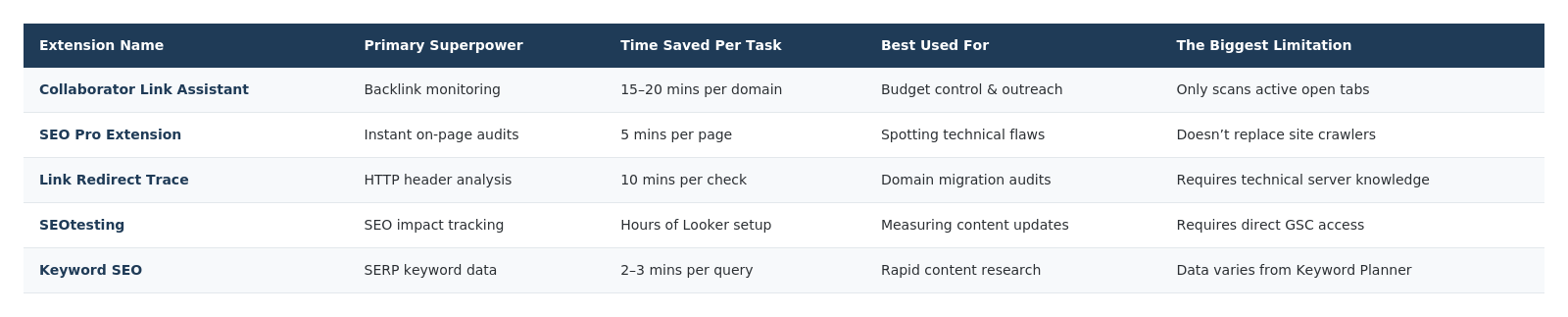
We know how difficult it is to find a needle in a haystack and choose the most effective tools from thousands; that's why we cut the fluff and curated a hyper-specific kit that tackles entirely different operational headaches. Here’s how they actually stack up when you work in the trenches.
Collaborator Link Assistant
Most link-building tools feel clunky, but Collaborator Link Assistant nails outreach automation perfectly. If you manage client budgets or buy guest posts every day, this tool is what you can really count on.
Core features that speed up your day:
- Price Checker in SERP matches search results with the Collaborator database, dropping placement prices right into Google and Ahrefs.
- Link Tracker Mode scans open tabs in the background and visually highlights your live backlinks. You never track placements manually again.
- Instant On-Page Check reveals link attributes (like sponsored or nofollow) and indexation status in one single click.
- Quick Save lets you bookmark sick donor sites straight into a prospect list while you casually surf.
We used this exact tool last month for a massive quarterly backlink cleanup on a SaaS client. The task was to analyze 500 links. How would we have done it before? Of course, we would have spent a lot of time processing the entire volume using the copy-paste-check method. However, this time we installed and ran Link Assistant across the open tabs.
The result was amazing. It flagged three high-tier placements where a webmaster slapped on a noindex tag. We fixed them within an hour. And yes, we saved both time and money.
SEO Pro Extension
When a client frantically calls because their homepage vanished from the index, you don’t have time to wait for a full Screaming Frog crawl. You need answers now. SEO Pro Extension tackles these panic-mode moments and immediately exposes critical rendering and markup messes.
What you pull in one click:
- Active indexation directives and canonical URL mismatches.
- Heading hierarchy structures (H1-H6) to spot content gaps.
- Core Web Vitals metrics from the browser API.
Imagine you plan to secure a premium link from a major news site and want to spend $250 on a sponsored post. Normally? You check their high Domain Rating, shrug, and pay the invoice. But if you fire up this extension first, you catch that a rogue noindex tag blocks the specific category page where they hide your article.
Link Redirect Trace
Broken redirect chains bleed valuable link equity. It’s a classic, massive failure point in SEO migrations. Link Redirect Trace rips off the band-aid, exposes hidden HTTP headers, and tracks the exact, messy path a URL takes. This guarantees you never accidentally water down your page rank.
We never execute complex site migrations or PBN linking strategies without this extension. Last year, we conducted a messy domain merge. Our team caught a hidden, rogue 302 temporary redirect sitting dead in the middle of a permanent 301 loop.
Pro Tip: Never blindly trust server-side rewrite rules without a visual browser check.
Pro Tip: Always run this tool on your destination URLs after you launch a redirect strategy to ensure complete equity transfer.
SEOtesting
When you try to figure out if your minor on-page tweaks worked via the native Google Search Console interface, it feels like a nightmare. SEOtesting bridges that gap and lets you track ranking bumps directly in your browser.
Heads up! This extension requires API access to your own Search Console properties. So yeah, it's completely useless if you want to snoop on a competitor's traffic drop.
Say you rewrite Title tags on 20 category pages to bump up click-through rates. You just drop a quick annotation via the extension. Two weeks later, you get a crystal-clear chart that shows if your CTR actually moved the needle.
Keyword Surfer
Traditional keyword research exhausts, doesn’t it? You constantly bounce between Google and heavy third-party software. Keyword Surfer fixes this. It injects search volume and CPC data directly into your SERP, turning casual googling into active content planning.
How it cuts out the busywork:
- Drops the exact search volumes under the Google search bar.
- Generates a sidebar packed with related long-tail semantic variations.
- Lets you export keyword clusters without opening another tab.
You figure out search intent and pull related entities at the same time. You stop copy-pasting target URLs into separate keyword tools.
Conclusion
Let’s wrap this up. Your browser should do the heavy lifting for you. If you constantly buy links, negotiate with webmasters, or stress over lost link equity, start right there. Discover various free SEO extensions to speed up work. At the first stage, install Collaborator Link Assistant and pin it to your bar. The extension kills that messy spreadsheet routine for good. Get your time back, and finally focus on the strategy that moves your rankings.
FAQ
Do free SEO extensions replace paid tools?
No. They handle daily checks and automation. You still need paid software for massive site-wide crawling.
Which extension saves the most time on backlink checks?
Collaborator Link Assistant visually highlights link attributes and indexation statuses directly on the page.
What is the best free SEO extension for workflow?
SEO Pro Extension surfaces critical technical and content data without heavy software.
Which free SEO extension is best for technical audits?
Link Redirect Trace beats everything for diagnosing HTTP headers, server responses, and dangerous redirect chains during migrations.
How do I track SEO changes for free?
Use SEOtesting. It overlays Search Console data and creates annotations to monitor how content updates impact traffic.
Which extension saves the most time on keyword research?
Keyword SEO saves time on keyword research as it displays search volumes and long-tail variations directly inside the Google search results.
About the Creator
Enjoyed the story? Support the Creator.
Subscribe for free to receive all their stories in your feed.
Comments
There are no comments for this story
Be the first to respond and start the conversation.