
4 Popular Topaz Video Alternatives
Topaz Video Alternative

You have the clip ready — an old home video, a noisy phone recording, or 1080p footage that needs to hold up on a bigger screen. Search for AI video enhancement, and Topaz Video AI comes up again and again. On upscaling, denoise, and restoration, it deserves that reputation.
But many users hit the same wall in 2026: subscription pricing that starts around $299/year (or $39–$59/month on other plans), hardware demands that rule out an average laptop, and a learning curve built for repeat use — not the occasional clip you want to fix before posting. If that sounds familiar, you are not looking for worse results. You are looking for a better fit.
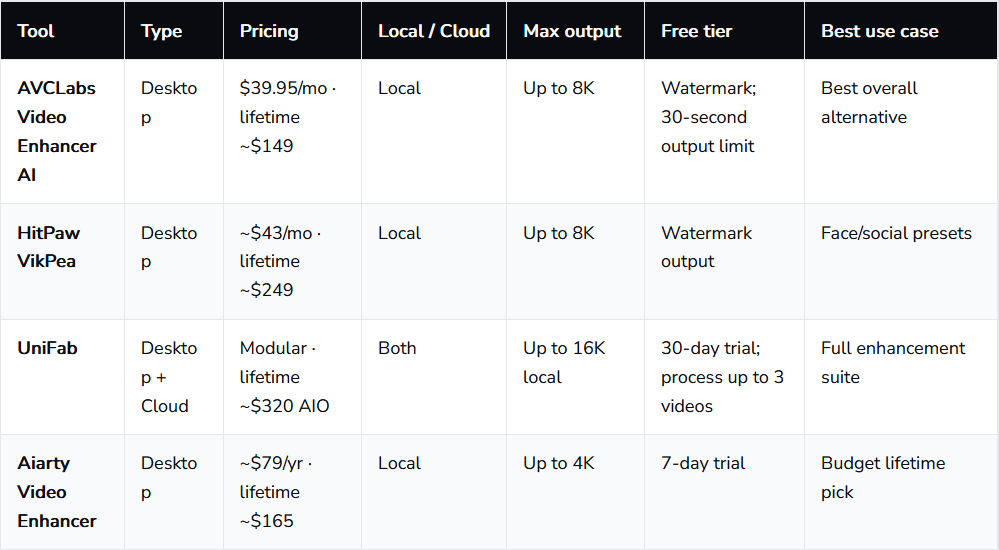
This guide compares 4 Topaz alternatives by price, PC requirements, ease of use, output quality, and speed.
1. AVCLabs Video Enhancer AI — Best Overall Topaz Video Alternative
AVCLabs Video Enhancer AI sits in a practical middle ground. It is not trying to copy every Topaz model name for name. Instead, it focuses on the jobs most people actually need: upscaling, denoising, deblurring, face improvement, stabilization, and colorization for older clips.
The interface is easier to learn than Topaz, but still deep enough for repeat users. You can choose single-frame or multi-frame models. The multi-frame path is especially useful for handheld footage, where motion consistency matters as much as sharpness.
- Best for: Home video restoration, face-heavy footage, creators who want strong quality and an affordable lifetime buy
- Pricing (2026): About $39.95/month, $95.96/year, or a lifetime license at $149.90 (recent promotional price)
- Platform: Windows and macOS, local processing

2. HitPaw Video Enhancer (VikPea)
HitPaw, now branded VikPea in some markets, is built around simplicity. Instead of asking which restoration model fits your footage, it pushes you toward practical presets: general enhancement, face optimization, animation enhancement, and similar one-click workflows. That makes it a strong fit for creators who process a few clips a week and want a polished result without learning model names or tuning sliders. The tradeoff is control — you get speed and convenience, but less room to fine-tune grain, sharpening, or artifact handling the way Topaz allows.
3. UniFab
UniFab is less "one enhancer" and more "a full post-production toolbox built around AI." If your workflow includes upscaling, denoising, deinterlacing, frame interpolation, SDR-to-HDR conversion, and format conversion, UniFab can replace several apps — not just Topaz. Content studios and power users often pick it when a single project needs multiple fixes before delivery, rather than a single upscale pass. FabCloud also gives you a path to GPU-heavy tasks without local hardware, though queue times can vary at peak hours.
4. Aiarty Video Enhancer
Aiarty has built its reputation around efficient local processing and texture-aware enhancement. Rather than pushing every clip toward maximum sharpness, its model options let you choose a more detailed look, a smoother natural look, or a stronger recovery mode for noisy or low-light footage. That flexibility suits YouTube creators and personal archivists who want 1080p-to-4K upgrades without an overprocessed look. On modern GPUs it tends to finish faster than Topaz on comparable jobs, though it is not built for 8K mastering or severely damaged archival sources.
About the Creator
Enjoyed the story? Support the Creator.
Subscribe for free to receive all their stories in your feed.
Comments
There are no comments for this story
Be the first to respond and start the conversation.